
The proposed settlement is not yet approved. The Court will be asked to approve the proposed settlement at the Settlement Approval Hearing.

Claim Form Guide
This guide explains how to get, complete, and submit the Claim Form for the Birth Alerts British Columbia (BC) Class Action. You can take your time, answer as best you can, and ask a Claims Helper for free support.
How to use this guide
This guide is not legal advice. This guide gives general information about the Claim Form. For legal questions, contact Class Counsel.
Read one section at a time. Answer as best you can and use approximate dates if you are having trouble remembering.

Before you begin

Get a Claim Form
There are different ways to get the Claim Form. The fastest way is to use the online Claim Form. You will need to have all your information ready to complete your Claim Form online. This guide can help you prepare.
You answer the questions, upload copies of your identification and submit the Claim Form online.
You can also download the Claim Form, fill it in, and mail or fax it with copies of your identification and other documents.
If you can’t download the Claim Form, a Claims Helper can also mail a copy of the Form to you. Call 1-833-632-6557 to speak to a Claims Helper.
Gather your information
Having these things ready might help you complete your Claim Form.
- A copy of your government-issued identification, front and back
- Certificate of Indian Status such as your status card, Métis Citizenship Card or Inuit Land Claim Beneficiary Card (if applicable)
- Your Personal Health Number
- Dates or approximate dates of pregnancies or births
- Hospital names or locations where you received prenatal care and/or gave birth
- Your contact information or alternate contact information if that applies
The Claim Form
There are two main sections of the Claim Form. This guide explains those sections in two steps.
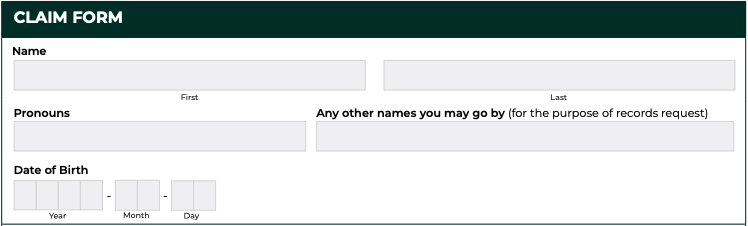
Step 1: Personal Information
Your name and identifying details
This section asks for:
- your full legal name (this should match your identification)
- your date of birth
- your pronouns
- any other names you may go by
The question about pronouns is there so people communicating with you can do so respectfully. You can answer this if you want to. You can also leave it blank.
You will also be asked if you have used any other names. This is important because records may be under a different name. This could include:
- a previous legal name
- a maiden name
- a nickname used in records
- a name you used at the time of pregnancy or hospital care
- different spelling of your name that may have been used previously
If you are not sure, include anything you remember. Even small details can help.
Click to open full size image
How to contact you
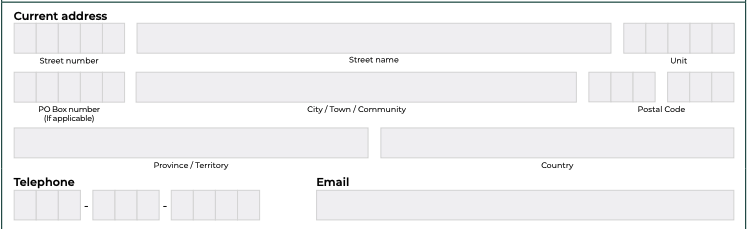
This section asks for your current address, phone number and email. This information is used to contact you about your Claim and is where your compensation payment will be sent if your Claim is eligible.
Use the best contact information where you can be reached.
If you move or your contact information changes, it is important to update it as soon as you can. You can update your contact information by emailing Info-BABC@BirthAlertsBC.ca or by calling a Claims Helper at 1-833-632-6557.
Email is helpful but not required. If you do not use email, you can still complete your claim.
Click to open full size image
Another contact person (optional)
This section asks if there is another person who can be contacted for you. This is optional. You may want to include someone if you may be hard to reach or need support communicating. Your alternate contact could be:
- a trusted family member
- a friend
- a support worker
This person may have access to information about you such as compensation amounts.

Click to open full size image
Personal Health Number
Here the Claim Form asks for your Personal Health Number. Your Personal Health Number can help locate hospital records connected to your pregnancy that may be used to support your Claim.

Click to open full size image
First Nations, Métis, or Inuit identity
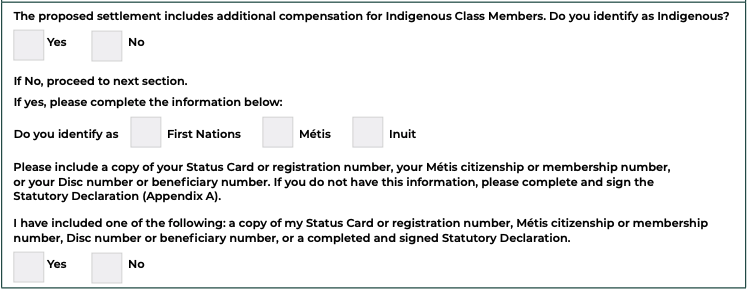
This section asks if you identify as First Nations, Métis or Inuit. You can make a statutory declaration OR provide a copy of a Certificate of Indian Status such as your status card, Métis Citizenship Card or Inuit Land Claim Beneficiary Card. You do not have to do both.
A statutory declaration is a written statement where a person confirms information about themselves and signs to say the information is true and correct. For the Birth Alerts BC Class Action, the statutory declaration in Appendix A of the Claim Form can be completed if you do not have documents about your Indigenous identity.
If you send a copy of your Certificate of Indian Status, send a copy of both the front and the back.
Click to open full size image
Pregnancy information
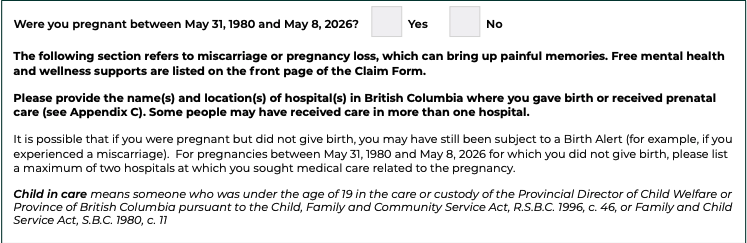
This section asks whether you were pregnant between May 31, 1980 and May 8, 2026 (the class period).
This helps decide whether your experience may be part of the class.
Answer yes or no.
Click to open full size image
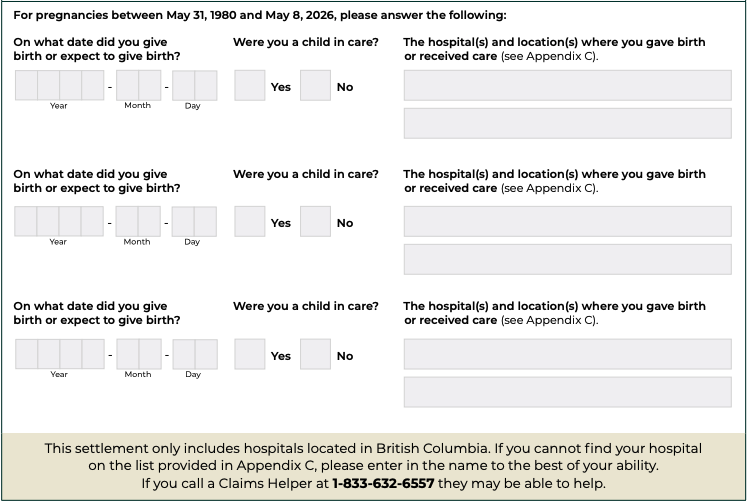
Dates of pregnancy, birth or expected birth
This section asks for the dates when you gave birth or expected to give birth.
If you have more than one pregnancy or birth to include, there is space to include that information.
List each date separately. If you do not remember exact dates, use the closest date or approximate information.
You are not expected to remember everything perfectly.
If you had multiple pregnancies to include, there is room on the Form to add more than one pregnancy.
Click to open full size image
Whether you were in care
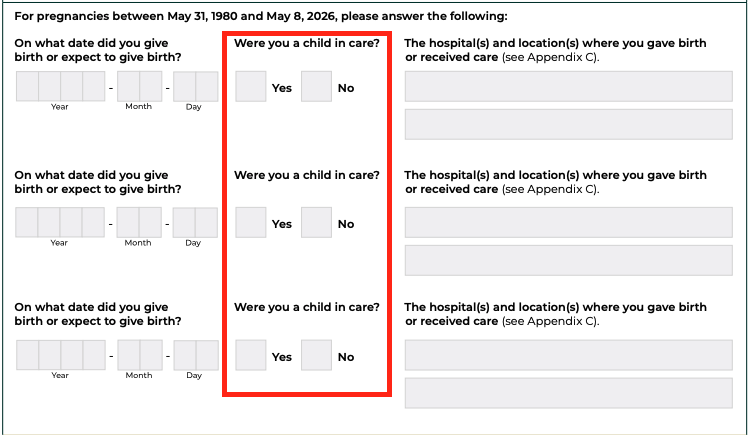
This section asks whether you were a child in care at the time of any date you listed.
“Child in care” means someone under the age of 19 who was in the care or custody of the Provincial Director of Child Welfare or the Province of British Columbia under child welfare legislation.
Answer “yes” only if you were both (at the time of pregnancy or birth date listed):
- under 19 years old and
- in the care or custody of the Provincial Director of Child Welfare or the Province of British Columbia.
For example, you may answer “no” if:
- you were under 19 but not a child in care or
- you were in care at another time in your life but not during that pregnancy.
This matters because it may affect whether you are included in the class. If you are unsure, answer as best you can.
Click to open full size image
Hospital information
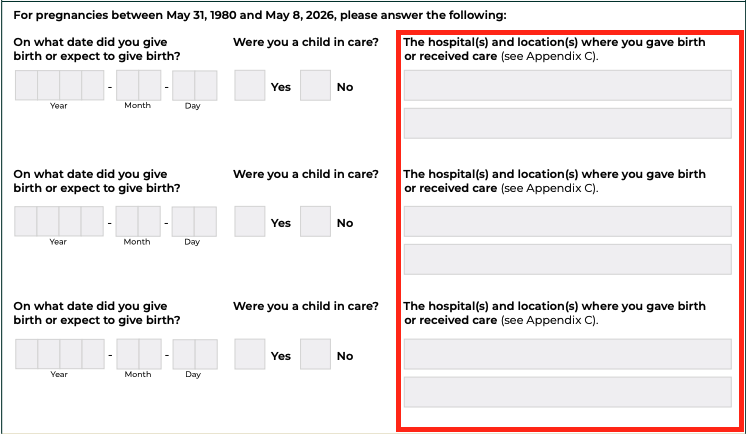
This section asks where you gave birth or received pregnancy-related care. This helps locate hospital records and confirm whether a Birth Alert may have been issued. It is important to understand that this settlement only includes hospitals in British Columbia.
If you did not give birth but received care, including miscarriage-related care, you can still list the hospital.
If you do not remember the hospital name, you can check the hospital list for locations. You can also contact a Claims Helper if you need assistance.
If you have more than one hospital to include there is space for that.
Click to open full size image
Identification
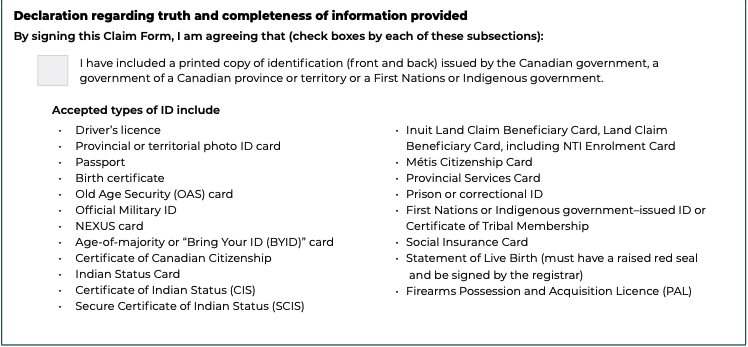
This section asks you to provide a copy of valid government identification, front and back.
Do not send original identification documents. Send or upload copies only.
If you are unsure what kind of identification to use, or need resources on how to get identification, a Claims Helper can help.
Click to open full size image
Step 2: Consent and declaration
Confirming your information
This is the final part of the Form.
It brings together everything you have shared and asks for your agreement to a few important things.
This section asks you to confirm three main things:
- The information you gave is true, to the best of your knowledge
- You understand how your information will be used
- You give permission for certain people to access and review information needed to process your Claim
You are being asked to confirm that your answers are true and complete, based on what you know. This does not mean you need perfect memory.
It is okay if:
- You do not remember exact dates
- Some details are approximate
Click to open full size image
Why access to hospital records is requested
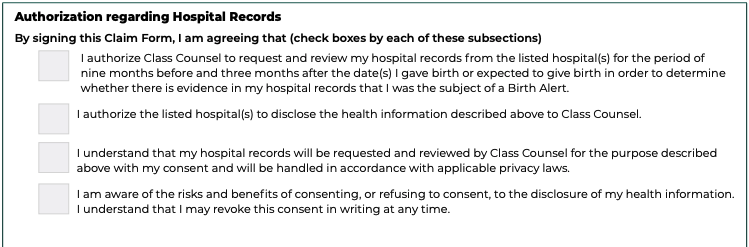
One part of this section asks for your permission to request and review hospital records. By checking the box and signing the Form, you are allowing Class Counsel to request records from the hospital or hospitals you listed, for a specific time period:
- About nine months before a birth or expected birth
- And up to three months after
These records may include information about your pregnancy, hospital visits, or care you received.
Hospital records are important because Birth Alerts were often not shared with the person they were about. Many people do not know if one exists.
Hospital records can help confirm the details of your Claim and identify whether there may have been communication from a child welfare worker to the hospital.
Click to open full size image
Permission to be contacted
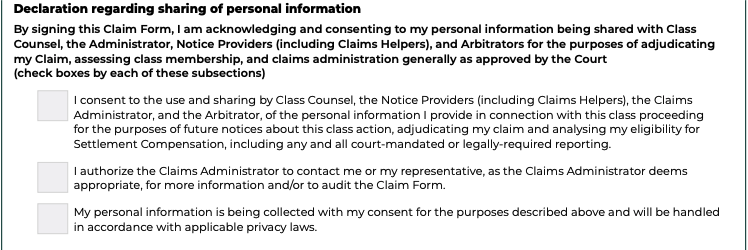
You are also agreeing that the Claims Administrator or Claims Helpers can contact you, or someone you identify as your representative, if needed. This may be to clarify information, ask for missing details, or confirm parts of your Claim.
Before signing:
- Read each statement slowly
- Ask questions if anything is unclear
- Talk to a Claims Helper if you want support
When you sign, you are confirming that you understand and agree to this section.
Click to open full size image
Before you submit your Claim Form
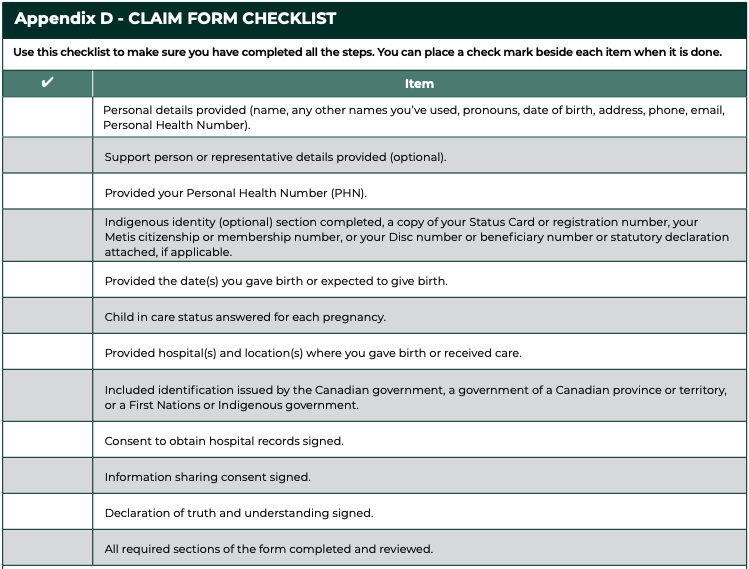
The Claim Form includes a check list to help you make sure all the information you need is completed. You can check that:
- You answered as best you can
- Your contact information is current
- You included copies of identification
- You included a hospital name in BC for each birth/pregnancy
- You reviewed the consent and declaration section
- You kept a copy, if possible
Click to open full size image
How to submit your Claim Form
You can submit your Claim online or submit your PDF Claim along with copies of your identification (no originals) by mail or fax.
If you can, using the online Claims portal is the quickest way to submit your Claim and supporting documents. You will receive a confirmation when your Claim has been submitted.
Submit by mail
P.O. Box 3355
London, ON N6A 4K3
Submit by fax
1-604-259-2225
Submit online
Go to the online Claim Portal to complete your Claim.